
This known malfunction by the SAP teams affects the SAP BusinessObjects platform in version 4.2 Service Pack 4. It is due to the Platform Search Application. This application allows users connected to the BI launch pad to search for content stored on the platform (documents, reports, files). It aims to refine search results by defining different categories and ranking results based on relevance (index). All patches of Service Pack 4 of this BI 4.2 version are affected. The bug is included in SP4.
*******************Update 09/25/2017*******************
SAP has just released Patch 3 of SP4 for this SAP BI 4.2 version. This patch fixes the malfunction of the platform search application but does not remove unwanted records. Therefore, the volume of your CMS database will no longer grow, but it will not decrease either. We recommend installing this SAP BI 4.2 SP4 Patch 3 version directly, which remains the most complete and stable version to date.
*********************************************************************
Detailed Operation
The platform search application monitors the objects present on the platform and indexes them in the database and on a file system. This application can be configured to be scheduled or run continuously. During its execution, it detects the presence of new content that requires indexing. This means every new object (Web Intelligence document, Universes, Crystal Report…) must be analyzed, cataloged, and indexed by the search service. However, on SAP BusinessObjects platforms in version 4.2 SP4, the indexing does not clean previously indexed objects, object creation is continuous, hence the (exponential in some cases) growth of the CMS database.
Resolution
A patch developed by SAP will soon resolve the problem. However, to prevent server saturation, we recommend temporarily disabling indexing. Please follow these instructions:
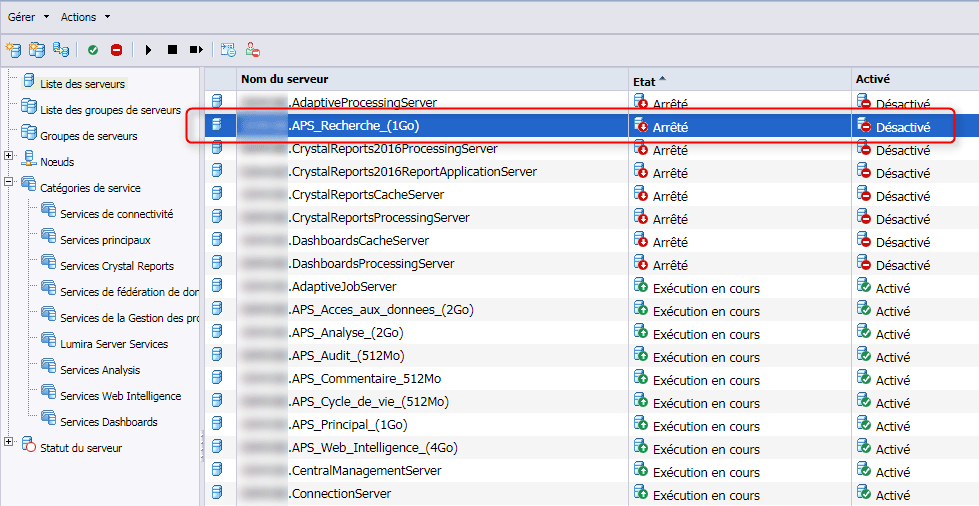
- – Go to the CMC, ” Servers” section.
- – Locate your logical server including the “Platform Search Service” service.
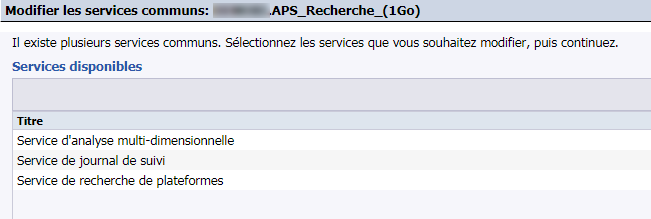
- – If a logical server is dedicated to it, or if it only includes the following services: “Multi-dimensional Analysis Service”, “Tracking Log Service”, and “Platform Search Service”, you can disable this server and stop its execution. Otherwise, it is preferable to contact us before making any changes.
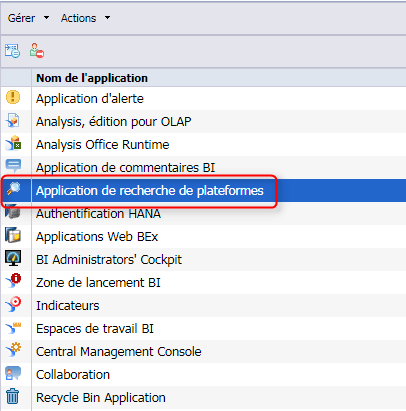
- – Then, from the ” Applications” menu, double-click on “Platform Search Application” in the list. The application properties then open.
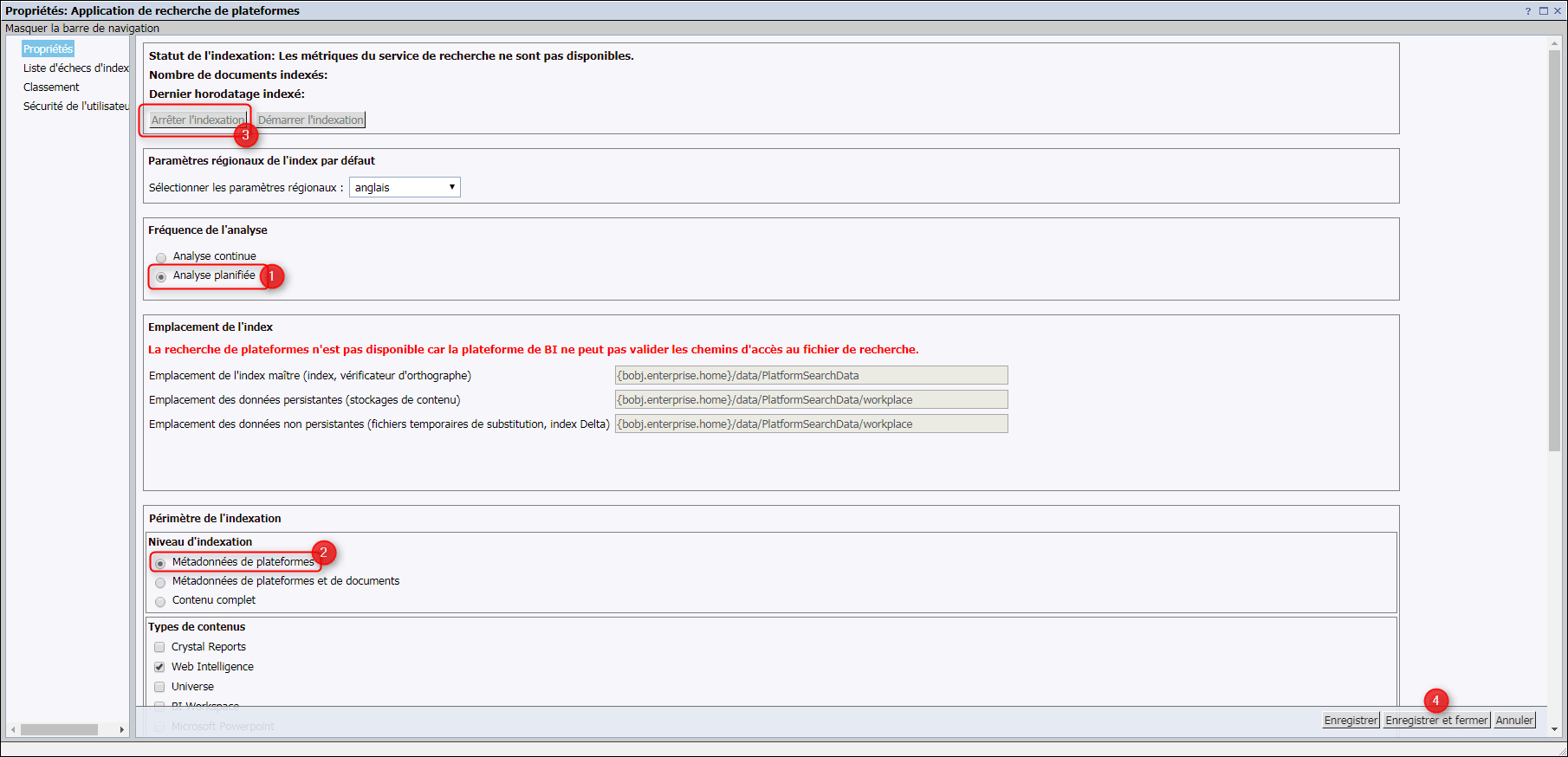
- – Change the “Analysis Frequency” parameter to “Scheduled Analysis”, with the “Indexing Level” option set to “Platform Metadata”.
- – Finally, stop the indexing using the button of the same name located at the top of the page and save the changes.
SAP BI 2025: The New Generation of BusinessObjects
Since the publication of this article, SAP has continued to innovate with the launch of SAP BI 2025, available since March 12. This new version marks a significant evolution compared to previous ones, with a particular focus on user experience and the creation of modern dashboards in Web Intelligence.
Among the major new features, you will find:
- An improved BI launch pad allowing KPIs to be pinned directly to the homepage
- New interactive elements in Web Intelligence to create modern dashboards
- An innovative export format allowing users to interact with exported documents in a browser without consuming BO licenses
- Simplified workflows offering a significant reduction in clicks
- An optimized BI platform with simplified migration and update processes
To further your knowledge on SAP BI 2025, we invite you to consult our detailed article on the JapprendslaBI site, our platform dedicated to the development of BI & Data skills. You will regularly find new tutorials there, particularly on this latest BI 2025 version.
We have also organized a webinar dedicated to the new features of SAP BI 2025, including a live demonstration of the tool. This session will allow you to discover how these developments can significantly improve your daily use of BusinessObjects, with more intuitive interfaces, increased performance, and new possibilities for visualizing and interacting with your data.
Feel free to contact us to assist you in your transition to SAP BI 2025 and fully leverage these new features!