
SAP BusinessObjects Lumira 2.0 – Designer
Introduction to the Successor of SAP Design Studio
This year, 2017, marks a convergence at SAP, with the arrival of SAP BusinessObjects Lumira 2.0 announced for early June!
Many expectations will be met, especially for this application, which is becoming increasingly important among SAP Analytics clients.
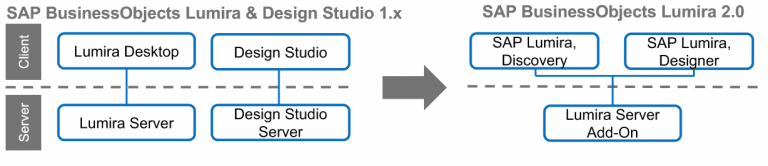
The applications we knew as SAP Lumira Desktop and SAP Design Studio are converging into one single application:
SAP BusinessObjects Lumira 2.0
> DISCOVERY: For the majority of your users who want to start with a simple and ergonomic application for personalized rendering and analysis. Discovery is primarily used for Datavisualization and to explore your data in a fun and interactive way. Perfect for starting, for creating mock-ups, for discovering trends, to answer ad hoc questions, in short, to facilitate access to Business Intelligence.
> DESIGNER: Successor of SAP Design Studio. This remains the application for designing dashboards, called analysis applications. It’s about designing applications in HTML5 format with an innovative visualization library and highly advanced technical components to meet all interactivity needs.
The BI Platform Server Add-On Evolves
One product (SAP BusinessObjects Lumira 2.0), two applications (Discovery & Designer), and one Server Add-On. This is the big good news: a single add-on to install and maintain, contrasting with the two previous add-ons that made updates long… very long and tedious.
SAP BusinessObjects Lumira 2.0 – Designer
In a previous article (which you can find here: SAP BusinessObjects Lumira 2.0 – Discovery), we introduced the new face of SAP Lumira Desktop by discussing Discovery (formerly SAP Lumira Desktop 1.x).
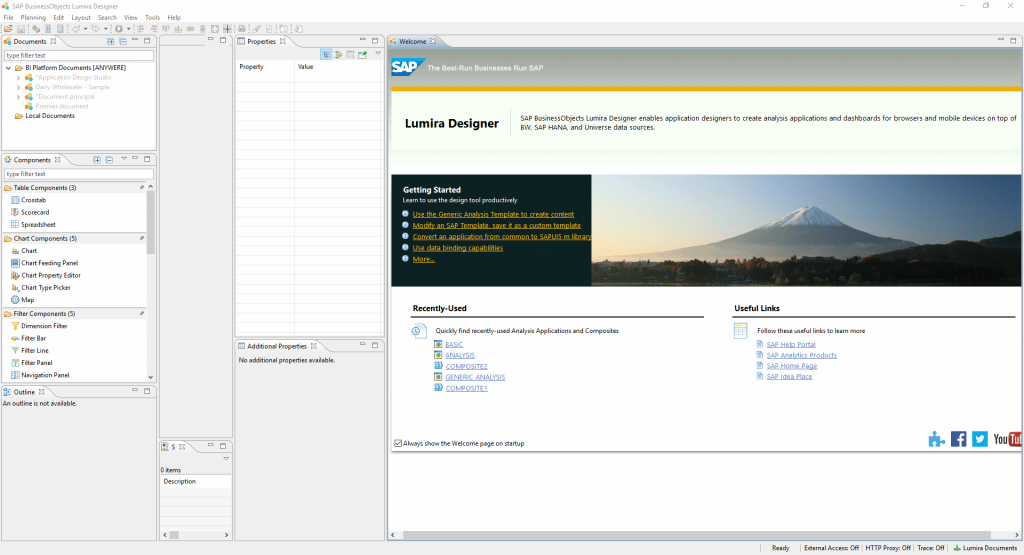
This time, we will introduce the other application from this convergence that transforms SAP Design Studio into SAP Lumira Designer. Note that already during the initial use of the application, there are no major interface changes either at startup or during the design phase. We maintain the same recipe with new ingredients that enhance the tool’s capabilities.
New Features and Functionalities
Beyond the clear change in commercial labels (yes, another one!) that underscores a technical and marketing shift, we have been able to test the new features brought by this new version. The main goal of this change is to make the coexistence between SAP Lumira Discovery (SAP Lumira 1.x) and SAP Lumira Designer (SAP Design Studio) much simpler and more intuitive.
- The components, stored in your repository or locally, are pieces of applications allowing easier management of a so-called important “application.”
- Conditional formatting for all, you can create simple and effective conditional formatting for your charts and cross tables.
- Change and improvement of PDF export! Preview in PDF format, total vectorization of your different components during export to PDF format.
- Improve the mobile experience, thanks to models and applications adapted to your mobile devices. The “responsive” design is here!
- Renovation of the Geomap (mapping) component, thanks to ESRI licenses included with SAP Lumira Designer, simply implement mapping to present and analyze your data.
- Improvement of prompts and dialog boxes with the availability of a calendar for prompts with, for example, a date selection.
The major novelty of this version is the simplicity of interoperability between SAP Lumira Designer and SAP Lumira Discovery, which we will present in detail in another blog.
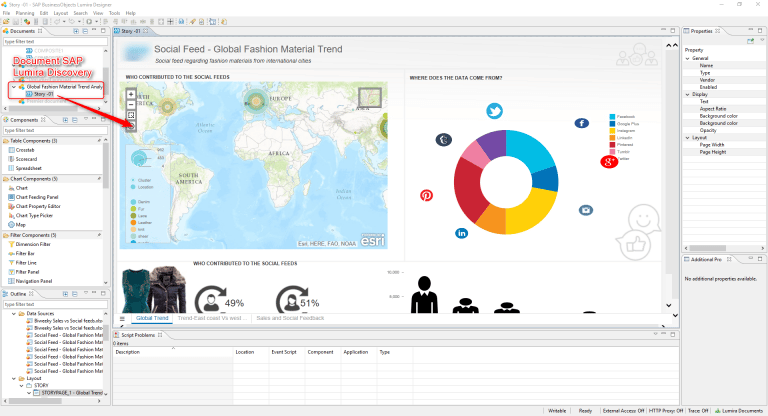
From the “Documents” zone of SAP Lumira Designer, simply retrieve your SAP Lumira Discovery document to easily integrate it into your SAP Lumira Designer application. Each “story” represents a reusable component by extension, in any application present in your repository.
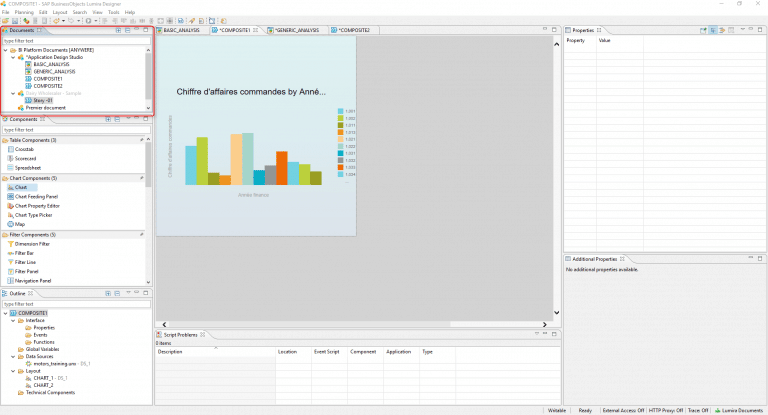
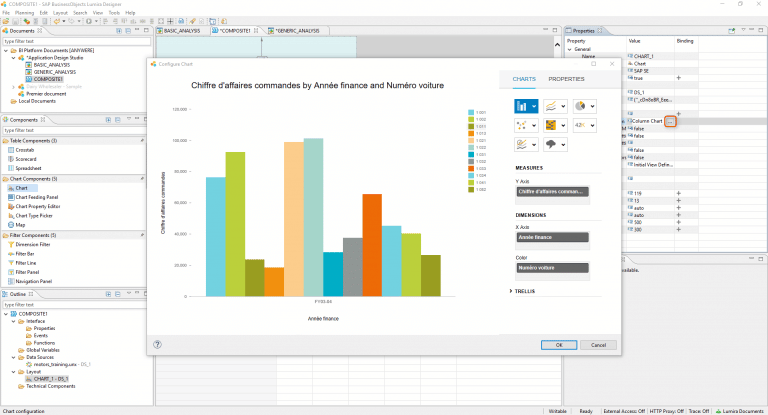
Modification of “Chart components.” Due to the convergence between SAP Lumira and SAP Design Studio, the different “models” at your disposal for designing your charts are identical to those available under SAP Lumira Discovery (formerly SAP Lumira 1.x). Moreover, for the design of the latter, we find exactly the same interface.
Example with the screenshot below
And What About the Design?
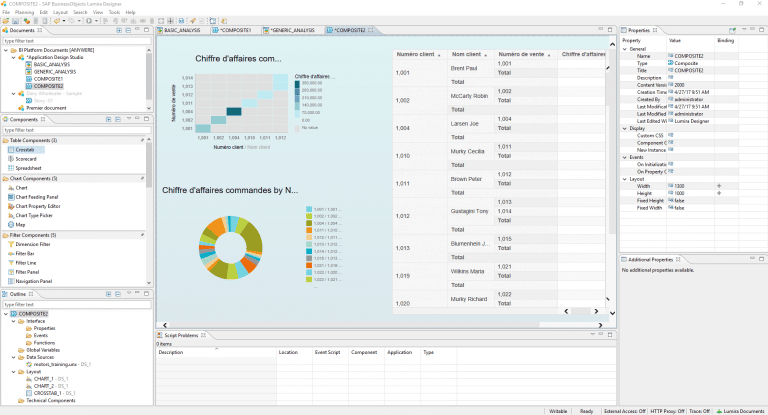
Regarding design, there are no major changes for SAP Lumira Designer, which maintains an interface almost identical to SAP Design Studio, so purists of the old version will not be disoriented when getting started with this new version. The only major change in this version is the appearance of the “Documents” tab. Now, you must create a document and then an application that will be composed of one or more composites.
In Brief…
These different choices by SAP clearly indicate a strong desire to create interoperability between SAP Lumira Designer and SAP Lumira Discovery.
To summarize our first tests, despite not having a significant design change, SAP Lumira Designer arrives with a host of new features, but primarily with a clear shift in the various existing features. This aims to make them compatible and consumable for and from SAP Lumira Discovery documents.
The objective is to fully leverage SAP Lumira Discovery’s easy story design and enhance their consumption and use from SAP Lumira Designer.
Like Yin and Yang, the two new SAP BusinessObjects Lumira 2.0 applications complement and interconnect, offering a wide range of possibilities for “Power users” or even occasional story creators.
Interoperability Between Discovery and Designer: Our Opinion!
We previously presented the new features of SAP BusinessObjects Lumira 2.0. It is now time to address one of the major topics mentioned by SAP and highlighted by developers: interoperability between these two applications, Discovery and Designer. What can be done on one side and the other? 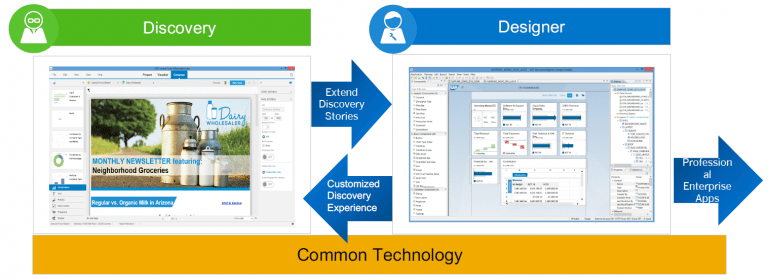
What Does Interoperability Consist Of?
One of the standout features highlighted by SAP is indeed the interoperability between the two applications. This compatibility or linkage was already present in the older versions of the two tools, but it was not as easy to exploit. Now, version 2.0 of SAP Lumira natively incorporates this resource sharing between SAP Lumira Discovery and SAP Lumira Designer.
 An extension to rule them all! #extension #LUMX
Now, with the *.LUMX extension you can consume your ” .lumx” document from any application. Depending on the application, features will of course vary. But we are indeed talking about a unique format for both Designer AND Discovery! So, despite two distinct applications, we are dealing with perfect cohabitation through a single and same file extension or format according to preferences. Consequently, the two applications are, by nature, complementary.
The Lab Cosmos Opinion
We were able to test the different applications in advance and observe (partly as it was still in BETA version) this interoperability. During our initial creations, we were surprised by the simplicity of sharing our different LUMX documents between Designer and Discovery. Let’s take a document we created with Discovery and later shared on the BI 4.2 server. In Designer, simply choose the “download a document” option to retrieve the document and use it: #bazinga For example, we created a document from SAP Lumira Discovery titled “Presentation of Figures – Cosmos Consulting,” this document comprises two stories. It was published and saved in our repository (where, of course, the BI Platform for SAP Lumira 2.0 add-on is installed, which we discuss in another blog post). 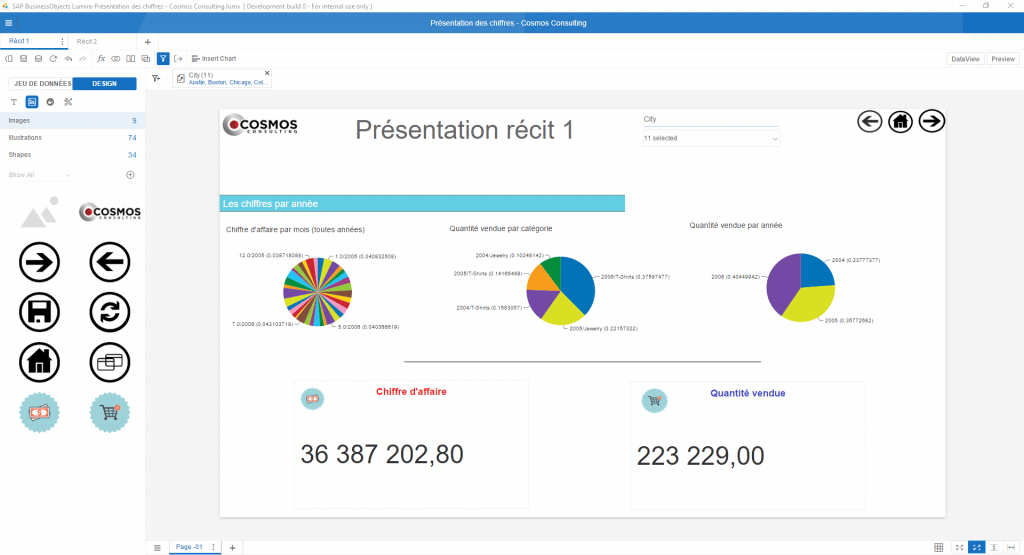 Once in the SAP Lumira Designer application, simply retrieve our document from the BI4 repository. It is notable that each “story” created under SAP Lumira Discovery corresponds to a “composite” under SAP Lumira Designer. You can from this point, create an application and add your available stories.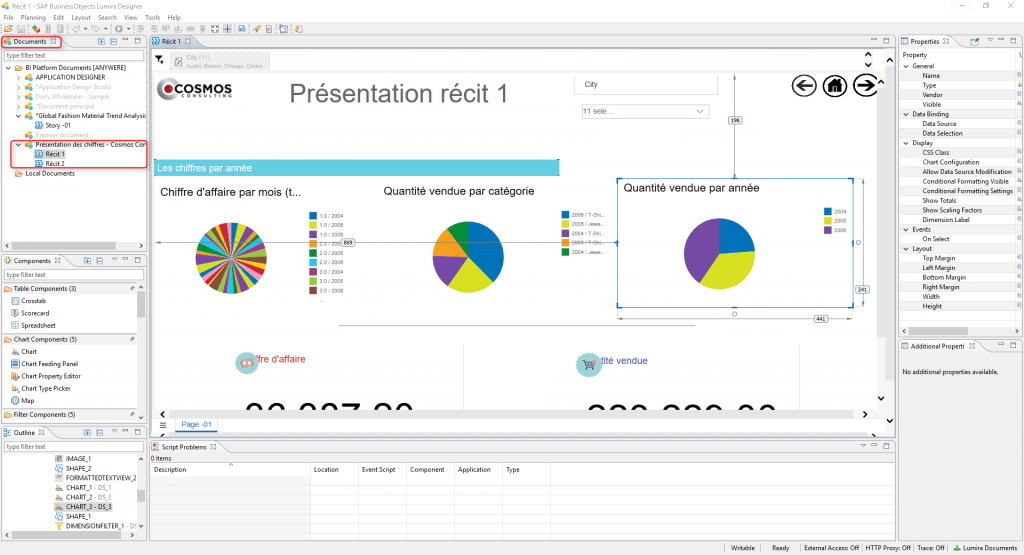
In Brief
The results are good. Sometimes, there are slight display differences between Discovery and Designer, but interoperability is native and enables quick and easy transitioning between applications: Bravo! Note that when you modify a *.LUMX document from Designer by, for example, adding a new application, you can no longer modify this application from Discovery. You can only modify the stories that were created from the latter.
The Unique LUMX File
A LUMX document can therefore consist of several elements:
- Application (created from SAP Lumira Designer and only modifiable from this application)
- Stories (created from SAP Lumira Discovery, and modifiable from both Discovery and Designer), noting that stories are considered “composite” under Designer
- Composites (Application component from SAP Lumira Designer or story from SAP Lumira Discovery)