The ADAX Production Tracking App: Planning and Scheduling on Microsoft Dynamics
To respond to intense national and international competition and the pressures from customers demanding more customization and faster manufacturing, industrial companies have every reason to integrate functionalities into their ERP to optimize their production chain.
Our ADAX Production Tracking application, which can interface with your Microsoft Dynamics 365 ERP, helps you plan all stages of the cycle, manage your production processes in a smooth and flexible way, while making optimal use of your resources. This way, you can reduce your costs while increasing your performance.
A quick response to the issues and challenges you face on a daily basis
Planning
Manage and optimize your production processes by tracking the progress of each order with a production schedule updated in real-time and easy rescheduling.
Resource Management
Gain wide visibility of your workshop situation to mobilize the right resources, supervise them in real time, and better manage uncertainties. This data will enable you to make the best decisions.
Cost Reduction
Closely monitor the progress of your production. This way, you better control your cost prices, manufacturing capacity, and time to be able to make savings.
From order to delivery, manage all your resources
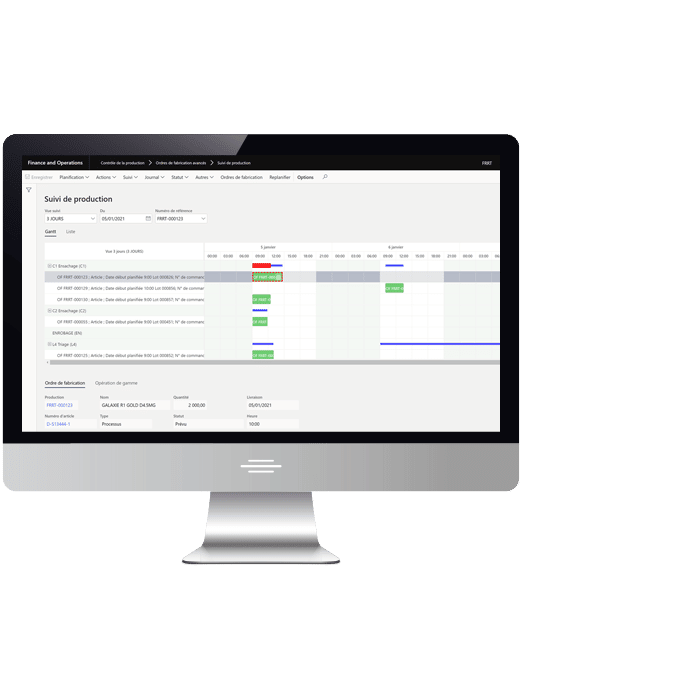
This dashboard provides a single point for all the information and functions necessary for planning and monitoring production, helping you improve responsiveness, reliability, and costs.
- Various customizable views, to both personalize the display and organize and secure the provision of functions.
- Gantt or Grid type display allowing you to visualize the scheduled Work Orders and quickly access detailed consultation functions (launching, material consumption, production entry declarations, quality control, etc.).
- Rescheduling made easy with the Drag & Drop function (drag and drop), with cascading impact on linked operations and WOs.

Features: An Essential Dashboard for Everyday Use
Action buttons from the screen (depending on user permissions):
- Make the modifications completed, schedule tasks, split the work order, lock for rescheduling, estimate the work order (preliminary calculation of the work order for theoretical standard PRI), launch the work order, start the work order, declare the end of the work order, reset the work order status, create a file (disputes, action plans) with Workflow.
Search buttons (depending on user permissions):
- Bill of materials & formulas, co-products, range, details of the work order, event history on the work order, consultation of available stock, consultation of stock transaction details, display of material consumption transactions, time, production entry, display of associated quality orders.