
For the many users of Microsoft Dynamics NAV, the question of transitioning to new versions offered by Microsoft becomes increasingly pressing as end-of-support dates approach. According to our Microsoft ERP experts, it is important to view this transition as a deep transformation, requiring a clear Cloud trajectory aligned with the strategic goals of the company.
Dynamics NAV, now Dynamics 365 Business Central, offers major improvements in terms of interface and features particularly suited to the needs of small and medium-sized businesses. With a Cloud-first architecture, Business Central allows smooth integration into the Microsoft ecosystem. However, when undertaking such a transition, it is essential to ask whether Business Central is still the most relevant choice, or if Dynamics 365 Finance & Operations (D365 F&O) would be more suitable for the present and future needs of the company.
D365 F&O, intended for larger enterprises, offers advanced financial and operational management capabilities on a global scale. The choice between these two solutions therefore depends on the structure of the company, the complexity of its processes, and its growth strategy.
The transition from NAV to Business Central or D365 F&O is not merely a technical migration. It is an opportunity to rethink the functioning of the company by adopting a modern digital approach and integrating Cloud solutions capable of supporting innovation. Data retrieval, compatibility of existing systems, and reorganization of business processes are essential vigilance points in this transformation.
In March 2024, the acquisition of Calliope Business Solutions by the TVH Consulting group reinforced our position among the leaders in integrating ERP solutions on the Microsoft Dynamics 365 platform. Thanks to our expertise, we support our clients in this transition, helping them define the best path, whether it is towards Business Central or Finance & Operations, while optimizing their digital transformation with the CallioPacks and ADAX suite.
The Legacy of Dynamics NAV & the Evolution to Dynamics 365 Business Central
Microsoft Dynamics NAV, now Dynamics 365 Business Central, has undergone a long series of evolutions since its acquisition by Microsoft in 2002. Microsoft has released many versions over more than 20 years, such as Dynamics NAV 4.0, 5.0, 2013, and 2017, each bringing significant functional and technical improvements. These updates have transformed NAV from an initially rigid solution into a modern ERP, accessible via the web and mobile devices.
Despite these technical transformations, the philosophy of Microsoft Dynamics NAV has remained intact over the years: to offer an integrated solution specifically designed to meet the needs of small and medium-sized businesses. The goal is to improve operational efficiency, notably by reducing repetitive tasks and double entries, while allowing businesses to benefit from robust management features tailored to their growth.
On the other hand, it is important to note that Dynamics NAV is reaching end-of-life. Standard support end dates have now been exceeded. Only Dynamics NAV 2017 and Dynamics NAV 2018 still benefit from extended support, until 2027 and 2028, respectively. In other words, it is becoming urgent to consider transitioning to Dynamics 365 Business Central to continue benefiting from security updates, fixes, and Microsoft support.
Dynamics 365 Business Central is also a “SaaS First” solution now, whose full value is realized when used in the Cloud, with automated updates. It thus benefits from integration with the Microsoft Cloud technology platform, allowing for much deeper innovation within the organization.
Migrating from Dynamics NAV to Business Central: Numerous Advantages and Functional Innovations
Improved Accessibility: A User-Friendly and Modular Interface
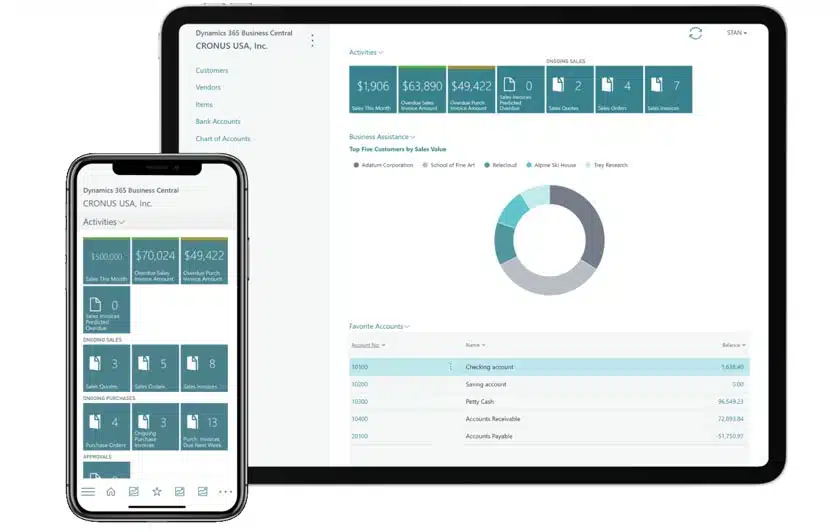
Microsoft Dynamics 365 Business Central offers an optimized user experience with responsive ergonomics (accessible on all types of devices: PC, tablet, smartphone). Navigation is facilitated by a modern action bar and a fast search engine. Error management becomes more relevant and processes can be automated via scripts.
Additionally, the native integration of ERP and CRM functionalities in a unified interface saves time and allows for more effective customization of customer interactions.
Effective Management and Analysis
With Business Central, users have access to “activity stacks” as soon as they log in, helping them prioritize their actions by offering a clear view of documents and relevant data in the form of lists or graphics. This improves productivity and decision-making.
Reports can be exported and modified in Excel, then re-imported into the ERP. Additionally, integration with Power BI allows for in-depth analysis, with ready-to-use reports accessible from Teams.
Enhanced Features: A Platform Reinforced by AI
Thanks to the Microsoft platform and the Azure Cloud, Business Central integrates innovations like AI with Copilot, accessible on all screens. Users can interact in natural language to obtain analyses, such as identifying slow-moving items. AI offers numerous use cases: automatic generation of descriptive texts, creation of sales lines based on historical data, and optimization of bank reconciliation. These innovations improve productivity and accelerate daily processes.

Increased Flexibility: A Clear and Advantageous Cloud Trajectory
While Business Central can be deployed in a private Cloud or On-Premise, Microsoft favors SaaS in the public Cloud for its rapid deployment and performance, with an availability guarantee of 99.995%.
The Azure Cloud offers high-level security and compliance, certified ISO, PCI, HIPAA, and GDPR, with continuous multilayered security controls to protect against cyber threats.
What are the Challenges of Migrating from Dynamics NAV to Business Central?
New Architecture
The transition to Dynamics 365 Business Central introduces a new architecture and several improvements over Dynamics NAV, including a more intuitive mobile-accessible interface, smooth integration with Office 365 reducing email exchanges, and simplified data customization without development.
However, these changes involve the loss of reports, customization, and other settings to which your employees were accustomed.
The CallioPacks and the native integration of Power BI will fill this gap with a more sustainable modular and customizable approach.
Technical Impacts
The transition to Dynamics 365 Business Central results in significant technical impacts. Data interfaces will need to be rewritten, providing an opportunity to streamline information flows through, for example, new interoperability with Dataverse. This allows synchronization of application repositories through simple settings, without requiring a dedicated ETL.
The new development tool of Business Central, Visual Studio Code, and AL technology facilitate the creation of non-intrusive business add-ons, enabling automatic updates and DevOps integration via GitHub.
Finally, the new Cloud architecture can be enhanced with telemetry services to monitor environment activity and ensure proactive scalability, thus guaranteeing optimal performance.

How to Accelerate Your Digitalization with Business Central and the Power Platform?
The innovations of Business Central are part of Microsoft’s strategy to enhance user experience and accelerate the digitalization of companies. With Power Apps, users can extend the ERP by creating simplified applications, while Power Automate allows automating workflows, such as approval processes, without any code line. The integration with Teams and a library of ready-to-use canvases reinforces this flexibility. The convergence of ERP, CRM, and business solutions within the Power Platform clearly shows Microsoft’s ambition for digital transformation of businesses.
Are You Hesitating Between Business Central and Dynamics 365 Finance & Operations? What are the Major Differences?
Microsoft offers two ERP solutions to meet business needs: Dynamics 365 Business Central and Dynamics 365 Finance & Operations. In the case of rapidly growing companies, which need to manage increasing complexity through multi-site, multi-company, or international processes, Business Central may encounter some limitations. Centralized management and oversight become more difficult to maintain as the organizational structure becomes more sophisticated. In these situations, Dynamics 365 Finance & Operations positions itself as a suitable solution.
In the case of a small or medium enterprise needing an agile integrated management solution to better connect its operations. Business Central will be the complete solution, capable of providing real-time indicators on process progress, resource usage, or profitability with a much faster startup.
Summary of Standard Functional Coverage of Both ERPs
To better understand the differences between Dynamics 365 Business Central and Dynamics 365 Finance & Operations, it is essential to compare their standard functional coverage.
| – | Dynamics 365 Business Central | Dynamics 365 Finance & Operations |
|---|---|---|
| Company Size | Small to Medium 20 to 250 users | Medium to Large 200 to +1000 users |
| Organizational Structure | Structure with simple or medium organization One repository per company | International organizations, multi- (legislations, companies, sites, etc.) in a single instance |
| Production | Discrete manufacturing | Discrete, process, lean and mixed modes |
| Inter-company | Via interfaces. Evolution planned by Microsoft | Native |
| International | Multi-everything but in separate databases | Multi-everything in a single database |
| Business Intelligence | PowerBi: Direct API BC (native BC connector in PowerBi) | PowerBI: Via Azure Synapse / Azure Datalake Gen2 |
| Availability | Legislation in 38 countries 24 languages | Legislation in 44 countries 24 languages |
| Administration | BC Admin Center | LCS (Lifecycle Services) but migration to Admin Powerplatform |
| Updates | Major updates: April and October Minor updates: 1 per month | Major updates: April and October Minor updates: 1 per month |
| Implementation Time | 4 to 12 months | 12 to 18 months or more |
| Development | AL Language (Application Language) | X++ Language In Visual Studio |
| Vertical Solutions | ISV via Appsource | ISV via Appsource |
| Volume | Thousands of transactions | Hundreds of thousands to millions of transactions |
| Licensing | CSP but EA possible | CSP or EA |
| Minimum users | No minimum, so 1 | 20 users |
| Accounting |  | |
| Credit & Collections | | |
| Fixed Assets | | |
| Project | | |
| Service | | |
| Production | | |
| Planning / MRP-CBN | | |
| Workshop Management | | |
| Sales | | |
| Purchasing | | |
| Inventory | | |
| WMS / TMS | | |
| Retail | Via LS Retail | |
| Configurator | | |
| Budget | | |
| Expense Report | Via CONTINIA | |
| CMMS | | |
| Quality | | |
| Human Resources | | |
| Landed Costs | | |
This table provides an initial overview but does not replace a comprehensive comparative study to verify if the available standard features truly meet the specific needs of your company. It is also important to assess if these core features can be enhanced by vertical or functional business solutions, like the ADAX suite for D365 F&O or the CallioPacks for D365 BC now available on Microsoft’s AppSource.
In summary, the differences between Business Central and Finance & Operations can be grouped into three main categories:
Ability to Manage Complex Organizations Scalably
Although both solutions are multilingual and designed to manage the specificities of many countries, they cater to distinct organizational needs.
Business Central is ideal for small and medium-sized businesses seeking to optimize their operations with a flexible and scalable solution. Meanwhile, for companies operating internationally and requiring greater organizational adaptability, Dynamics 365 Finance & Operations may offer greater agility.
Functional Depth
While Business Central meets the needs, with solid functional depth, particularly in financial management, sales management, and production management for an increasing number of businesses, Dynamics 365 Finance & Operations offers more advanced features for large organizations, particularly in sectors like industry or supply chain management.
Customization Capacity
Finally, the customization capacity differs between the two solutions. Business Central, while customizable, favors a standard use with light extensions to remain simple and accessible. Dynamics 365 Finance & Operations, on the other hand, offers deeper customization, particularly suited to large companies with tailor-made needs.
However, with partner solutions like CallioPacks developed by Calliope Business Solutions, Business Central can be enhanced to meet more specific industry needs.
Calliope Business Solutions thus offers the possibility of leveraging Business Central to its fullest while ensuring that the solution remains aligned with the company’s objectives.
Feel free to contact TVH Consulting for an in-depth comparative study of these solutions in line with your sector’s needs, as well as for support in executing this migration.