
Presentation of the New Features in 4.2 SP4
It’s finally here! The new version of SAP BusinessObjects 4.2 SP4 is now available for download.
We extensively presented all the new features of this 4.2 SP4 version in our previous blogs, which you can find right here: SAP BI 4.2 SP4 finally available and here: New Features of BI 4.2 SP4. It’s important today to provide a detailed review of these new features because yes! We have already installed this new version and conducted various tests to give you the clearest and most objective opinion possible.
In this new blog post, we will discuss the new features of Web Intelligence.
Let’s Get Straight to the Point: Web Intelligence!
Since version 4.2, SAP had focused on enhancing the design of Web Intelligence reports and the overall user experience. With this support pack 4, they continue with improvements and new features in terms of visualization and user experience.
Secure Foundation
Improvement of Custom Elements
For fans of custom elements, you’re in for a treat. You now have a new customization API and improved rendering. Despite SAP’s efforts, this programming interface remains quite complex to grasp… Novices, beware!
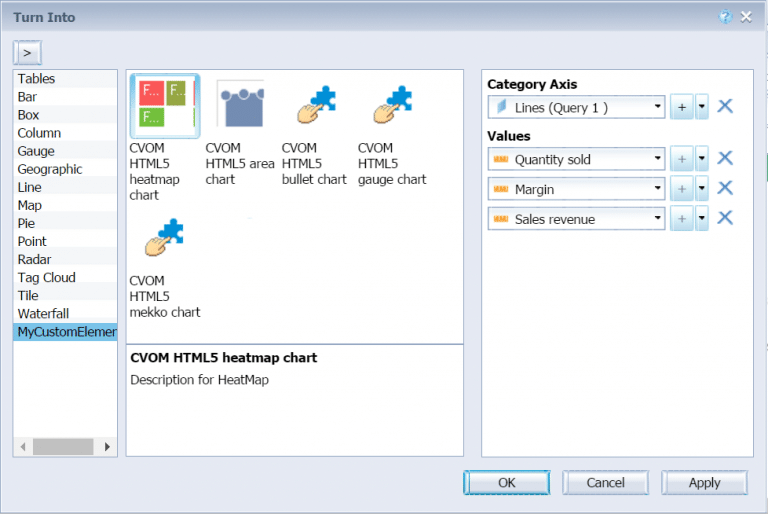
However, for the dialog box allowing you to select custom elements in your reports, you’ll be happy to learn that it is now easier to identify the various custom elements at your disposal. Proof in the image:
Calculation Extensions: Custom Functions
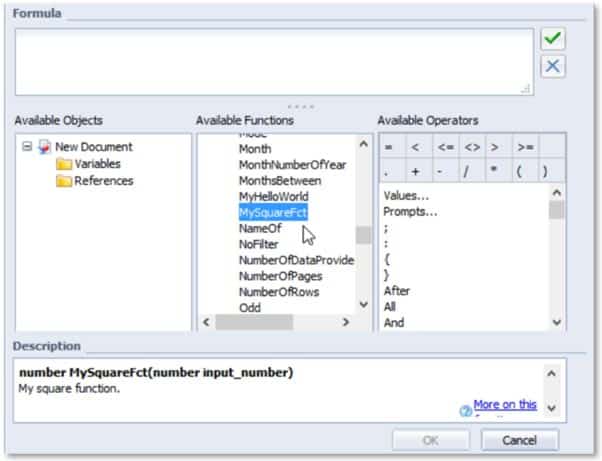
The creation of custom Web Intelligence functions (via Visual Studio 2015) is a flagship feature, allowing you to create fully customized functions as you wish.
To conclude on the new features dedicated to functions, we introduce two new functions “TimeBetween” and “DateBetween”
- TimeBetween: returns the number of periods between two dates, considering the time.
Example: TimeBetween([Begin Date];[End Date];HourPeriod) returns 2 when [Begin Date] corresponds to June 30, 2016, at 8:45, and [End Date] corresponds to June 30, 2016, at 10:05.
- DateBetween: returns the number of periods between two dates without considering time.
Example: DatesBetween([Begin Date];[End Date];MonthPeriod) returns 2 when [Begin Date] corresponds to June 30, 2016, and [End Date] corresponds to August 3, 2016.
These new functions are quite useful, allowing an easy calculation of periods between two dates with or without hours!
REST Web Services
For the improvements, we appreciate a significant enhancement of Web Intelligence REST Web Services with the integration of new APIs bringing the appearance of:
- Grouped input control
- New options for lists of values
- A “save/save as” feature (yes, indeed…!)
- New export options
- Element linking
- Reading comments
As someone who was quite skeptical about using REST Web Services in Web Intelligence, I must admit these improvements are quite effective, making it clearer and simpler to use. (and especially allowing a much more efficient analysis)
Batch Universe Change
You’ve just upgraded to version 4.2 and want to take advantage of the latest UNX universes? Haven’t migrated yet? Discover our packaged offers
A major headache has been removed as it is now possible to batch modify the data sources of Web Intelligence documents.
This is great news for users who want to migrate to this new BI4 version…
BI Launchpad “fiori” and New Web Intelligence Interface
In line with the new BI launch area, the user experience is greatly improved with this new visualization (based on the fiori style). The primary goal is to simplify the reading and analysis of Web Intelligence reports. Designed for touch (and thus mobile BI!), this new visualization is available for all your Web Intelligence reports. The choice to view with this new interface or not is also available! More information in our post dedicated to this launch area intended to promote adoption of the BI platform. As images speak louder than words… This new interface aims to be sleek and intuitive. The only downside is that we currently cannot modify our reports from the BI Launchpad. An option is still available to open the “designer” to switch back to the traditional Webi interface and thus modify your document. The “Interactive Viewing” mode is back with advanced sorting and ranking features but still as a simple reader. More information on the new “Web Intelligence Unified Viewer” in our specialized post. Attention! The new Web Intelligence visualization does indeed have limitations such as:
- Replying or creating a comment
- Folding and unfolding breaks and/or sections
- Freezing headers
- Creating or editing a Web Intelligence document
Other New Features!
It’s now possible to massively change the universes used by Web Intelligence reports but only from UNV to UNX. We conducted internal tests and it works extremely well! Enough to reassure you about converting your universes to the UNX format! For those using SAP HANA HTTP technology, Web Intelligence now supports this alongside analysis features (hierarchy, direct access, custom universes).
- Evolution from Tomcat 8 to Tomcat 8.5.13
- Migration to SQL Anywhere 17 for hosting audit and CMS databases
- Possibility of using special characters in the “Administrator” password and for LCM
- New connectivities are now supported in BI 4.2 SP4
- New APIs for SAP Crystal Reports (JAVA)
- Enhancement of SMTP settings via SSL
- Limitation of documents in the BI inbox in the same way as in public folders and favorite folders
- Possibility to batch change the source of documents pointing to a “UNV” universe to point them to a “UNX” universe (very useful function after converting your UNV universes to UNX)
- New REST web services and various improvements
- Performance improvement of the platform search and indexing
- New description area for “variables” and “references” in Web Intelligence
Our Opinion
Despite some shortcomings, this new interface brings a lot of freshness to the way Web Intelligence reports are viewed. We also appreciate that the formatting of reports is not altered at all in this new interface. New blog posts are coming on the new features of the semantic layer and the administration of your platform.
SAP BI 2025: The Next Generation of BusinessObjects
Since the publication of this article, SAP has continued to innovate with the launch of SAP BI 2025, available since March 12. This new version marks a significant evolution compared to previous ones, with a particular focus on user experience and the creation of modern dashboards in Web Intelligence.
Among the major new features, we find:
- A BI Launch Area with improved performance allowing you to pin KPIs directly to the homepage
- New interactive elements in Web Intelligence to create modern dashboards
- An innovative export format allowing users to interact with exported documents in a browser without consuming BO licenses
- Simplified workflows offering significant click savings
- An optimized BI platform with streamlined migration and update processes
To deepen your knowledge of SAP BI 2025, we invite you to read our detailed article on the JapprendslaBI site, our platform dedicated to BI & Data skills development. You will find new tutorials regularly, especially on this latest version BI 2025.
We also organized a webinar dedicated to the new features of SAP BI 2025, including a live demonstration of the tool. This session will allow you to see how these developments can significantly enhance your daily use of BusinessObjects, with more intuitive interfaces, increased performance, and new possibilities for visualization and interaction with your data.

Feel free to contact us to support you in your transition to SAP BI 2025 and fully take advantage of these new features!